Please confirm the product version, install and use the latest version (it is recommended to visit the official website https://drfone.wondershare.com/ to download and install again).
If the latset version is used, then please kindly check the below resolution:
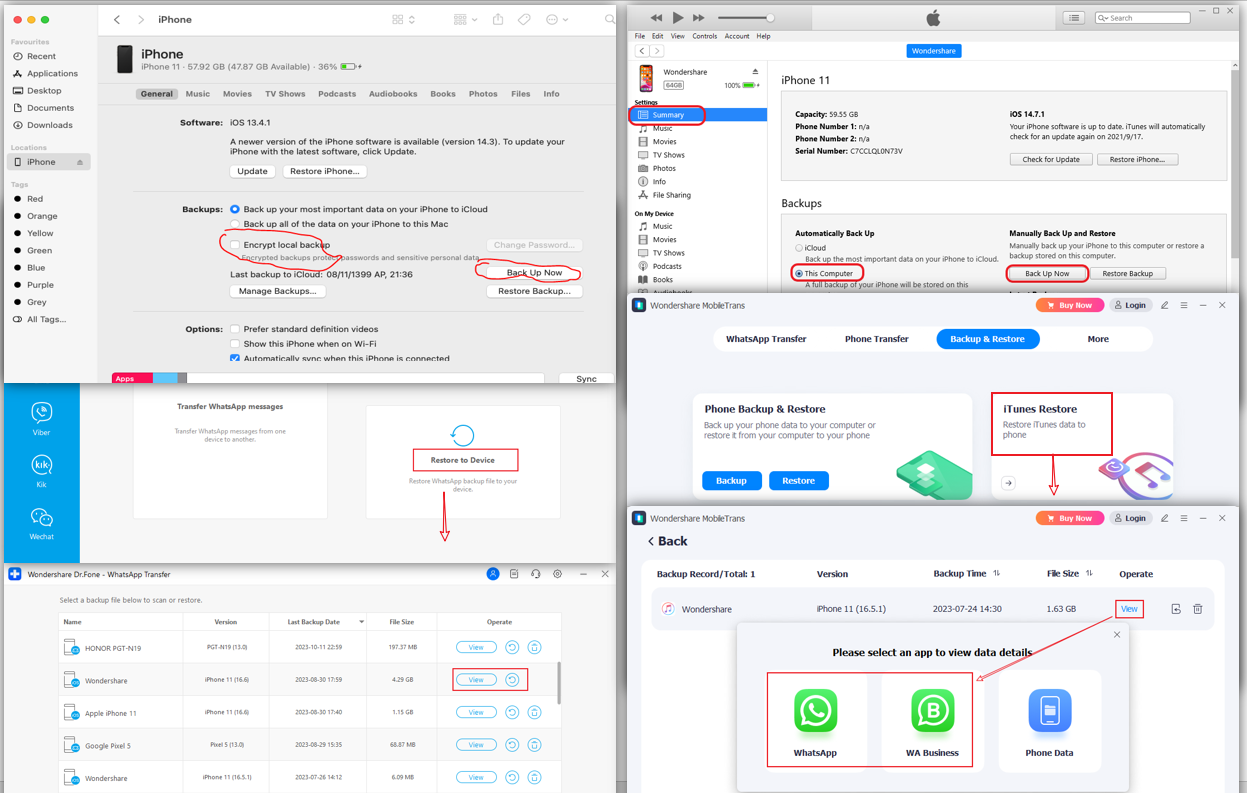
- Please restart iPhone and use Finder/iTunes to backup iPhone, the software can read WhatsApp data from iTunes backup files (Uncheck the Encrypted local backup);
- After the backup is successful, click iTunes Restore(Restore to Device ) - View in the program to preview and check if the backup file data is complete;
- If the backup file data preview shows complete chat information, you can directly restore the WhatsApp from the iTunes backup file to the target device.
Was This Helpful?
Thanks for your feedback.
Can you tell us what didn't work for you?
Email address is optional. Leave it blank if you do not need follow-up.
Feedback sent!