First, please check where you purchased the product—through the App Store, Google Play, or the Wondershare official website.
-
If the order was placed via the App Store or Google Play, please request or modify the invoice directly through Apple or Google, as invoices for these purchases are issued by their respective platforms.
Below are some instructions that may help you:
- For Wondershare.com orders, please follow these instructions to get or modify your invoice.
Step 1: Sign into Wondershare Account Center with your Wondershare ID and password.
Step 2: Under My Order, click Order History.

Step 3: To request an invoice, click Get Invoice next to your order.
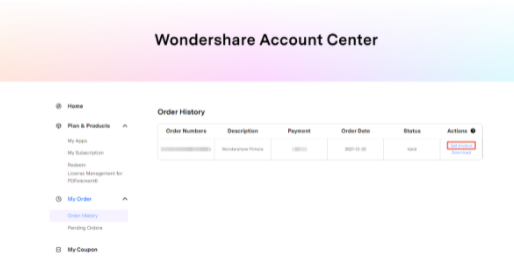
Step 4: Input your name, address, and VAT number (note: address and VAT number are optional), and then click Submit.

Step 5: The invoice will be sent to your licensed email address within one hour. If you do not receive it, please check your spam or junk folder, as the email may have been filtered or blocked by your email server.
Was This Helpful?
Thanks for your feedback.
Can you tell us what didn't work for you?
Email address is optional. Leave it blank if you do not need follow-up.
Feedback sent!