When transferring WhatsApp from iOS to Android, there is no option to allow storage permissions.
Please kindly refer to thr resolution:
1. Exit Dr.Fone and try transferring or restoring again.
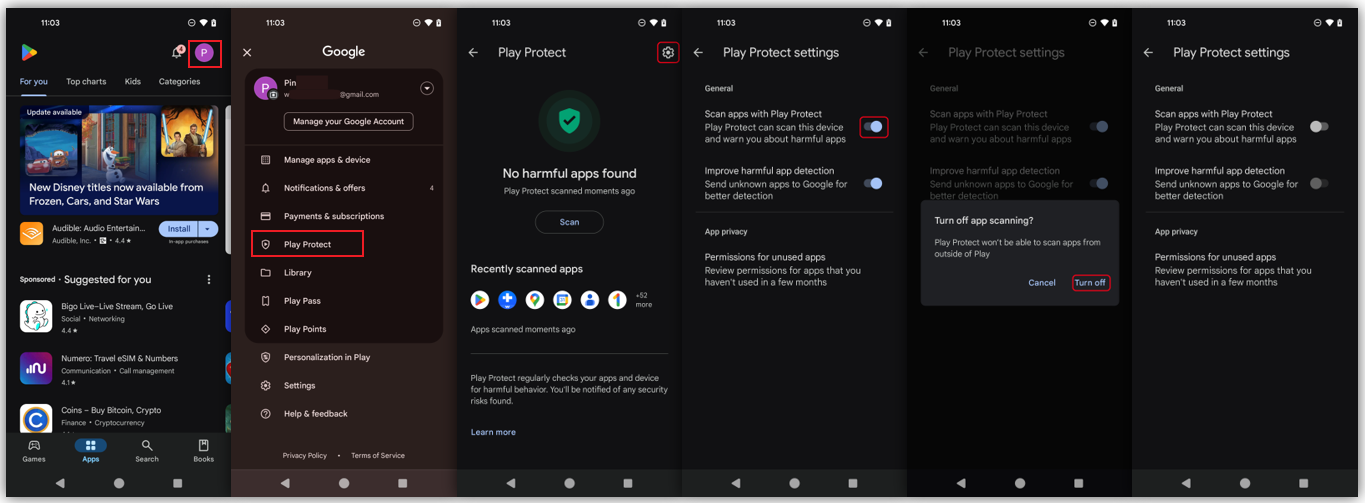
2. Disable Google Play Store's Play Protect, and re-enable it after resolving the issue.
1.Open the Google Play Store app .
2.At the top right, tap the profile icon.
3.Tap Play Protect Settings .
4.Turn off Scan apps with Play Protect
3. Do not install WhatsApp from the Google Play Store. Instead, follow the instructions provided by Dr.Fone to install the recommended version of WhatsApp.
Was This Helpful?
Thanks for your feedback.
Can you tell us what didn't work for you?
Email address is optional. Leave it blank if you do not need follow-up.
Feedback sent!