You can easily apply for a self-refund of the tax charge for orders made from our official website directly from your Wondershare account. Please follow the steps below:
Step 1: Log in to Your Account: Sign in to the Wondershare Account Center using your Wondershare ID and password.
Step 2: Navigate to Order History: Click on "Order History" under the "My Order" section.

Step 3: Request an Invoice: Find the corresponding order and click the "Get Invoice" button next to it.
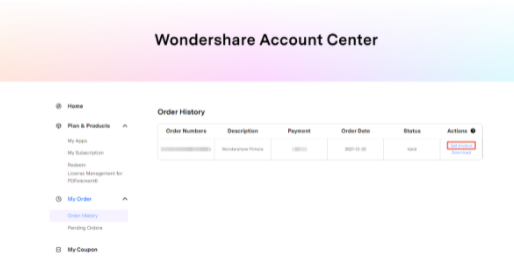
Step 4: Submit Your Tax Information:
-
Fill in your Name, Address, and VAT Number.
-
Click "Submit".

What Happens Next?
-
An invoice will be emailed to your licensed email address within 1 hour.
-
Your tax refund request will be automatically submitted simultaneously.
-
Please allow 3-7 business days for the refund to be processed and credited back to your original payment account.
If you do not have a VAT number but possess a valid tax exemption document, please email it to us at customer_service@wondershare.com. Our support team will promptly process a tax refund for you using the provided document.
Was This Helpful?
Thanks for your feedback.
Can you tell us what didn't work for you?
Email address is optional. Leave it blank if you do not need follow-up.
Feedback sent!