To use the Pen Tool in Filmora:
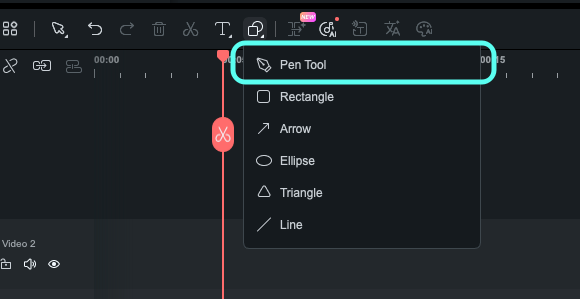
- Open the Drawing Tools panel.
- Locate the Pen Tool icon.
- Click the icon to enter Pen Drawing mode.
To view all product offerings, software details, and pricing, visit overview.
Explore additional support options if you can’t find
what you’re looking for.
Sign in with Wondershare ID to get invoice, redeem
serial number, cancel subscription, etc.
Can’t find the answers you’re looking for? We’re
here to help.
Was This Helpful?
Thanks for your feedback.
Can you tell us what didn't work for you?
Email address is optional. Leave it blank if you do not need follow-up.
Feedback sent!