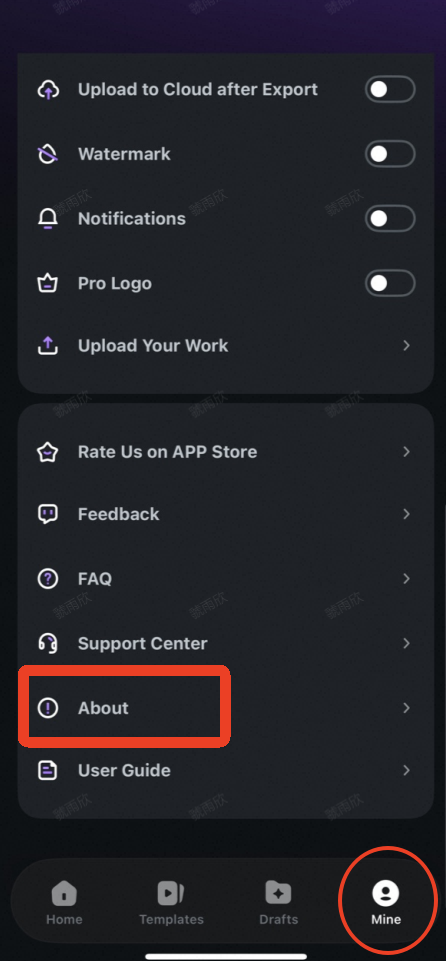
iOS (Apple) Devices:
- Open the Filmora app
- Tap "Mine" in the bottom right corner
- Tap "About"
- View the version number on this page

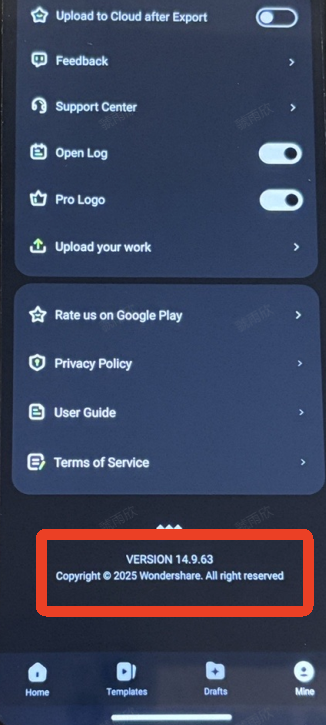
Android Devices:
- Open the Filmora app
- Tap "Mine" in the bottom right corner
- Scroll down to the bottom of the page
- View the version number at the bottom

Was This Helpful?
Thanks for your feedback.
Can you tell us what didn't work for you?
Email address is optional. Leave it blank if you do not need follow-up.
Feedback sent!