Step 1: Tap Features and then tap Inappropriate Pictures.
Step 2: Turn the toggle on next to Enable the switch to detect to monitor suspicious
pictures on your kid's device.
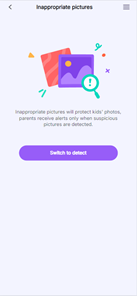
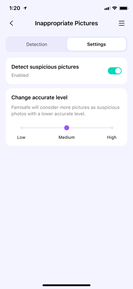
Step 3: Tap on the setting icon on the right top corner and then tap Settings.
Step 4: Choose the accurate level. The higher level you set up, the fewer photos will
be considered suspicious.
Step 5: You can manage suspicious photos by tapping on the setting icon > Edit.
Step 6: Select the photo you would like to delete and tap the dustbin icon on the right
top corner.
Was This Helpful?
Thanks for your feedback.
Can you tell us what didn't work for you?
Email address is optional. Leave it blank if you do not need follow-up.
Feedback sent!