Situation 1: Never used FamiSafe Connect on the computer for upgrading supervision. First, you need to delete the FamiSafe profile in Settings > General > Device Management menu. Then if the Fammy icon still appears on the home screen, you can uninstall it by long-pressing. If there is a white icon (web bookmark) also, delete it in the same way. 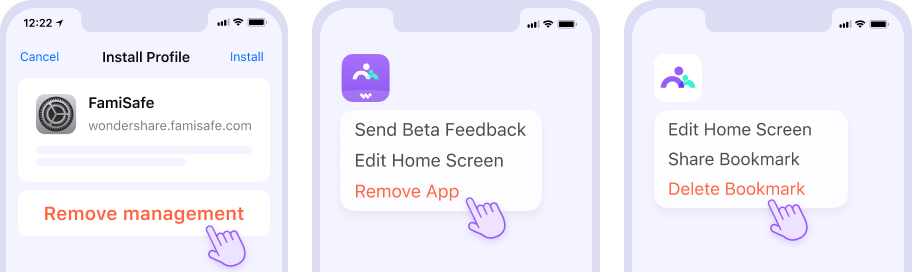
Note: If you need to reinstall FamiSafe on your kid's iOS device, please make sure you have deleted both the app and the MDM file from the device first. After that, you can reinstall FamiSafe from App Store and follow the on-screen instruction to reinstall the MDM file.
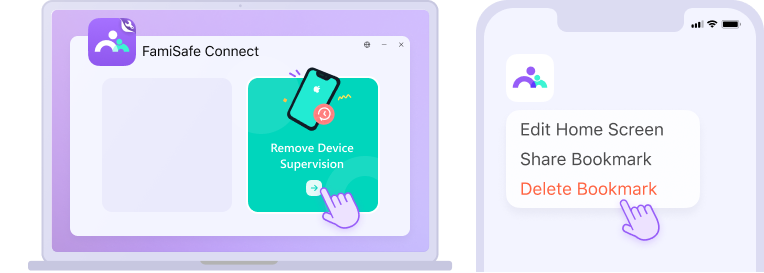
Situation 2: Once used the FamiSafe Connect on the computer for upgrading supervision. You need to use FamiSafe Connect on your computer to remove device supervision. If there is a white icon (web bookmark) on the home screen, you can delete it by long-pressing.
Note: If you need to reinstall FamiSafe on your kid's iOS device, please make sure you have deleted both the app and the MDM file from the device first. After that, you can reinstall FamiSafe from App Store and follow the on-screen instruction to reinstall the MDM file.
Was This Helpful?
Thanks for your feedback.
Can you tell us what didn't work for you?
Email address is optional. Leave it blank if you do not need follow-up.
Feedback sent!