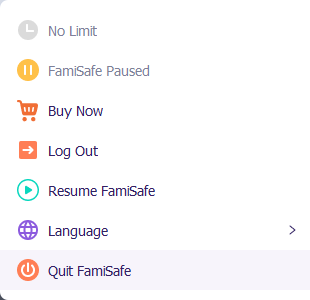
- Click the Fammy icon in the lower right corner of the taskbar.
- Click Quit Fammy. Enter the password of your FamiSafe user account to continue, and close the FamiSafe program.
- Go to Control Panel and select Uninstall or Change Programs.
- Choose Wondershare FamiSafe and click Uninstall. Follow the prompts and click Next to finish the uninstallation.
How to uninstall Fammy from kid’s Windows devices?

Need More Help?
Explore additional support options if you can’t find
what you’re looking for.
Account Center
Sign in with Wondershare ID to get invoice, redeem
serial number, cancel subscription, etc.
Contact us
Can’t find the answers you’re looking for? We’re
here to help.
Was This Helpful?
Thanks for your feedback.
Can you tell us what didn't work for you?
Email address is optional. Leave it blank if you do not need follow-up.
Feedback sent!