1. Check and restart operations
(1)Please check whether the VPN status on the child's device is turned on normally. (2)If the VPN status is normal, please try the following steps: (3)Restart the child's device. (4)Restart the Fammy app.
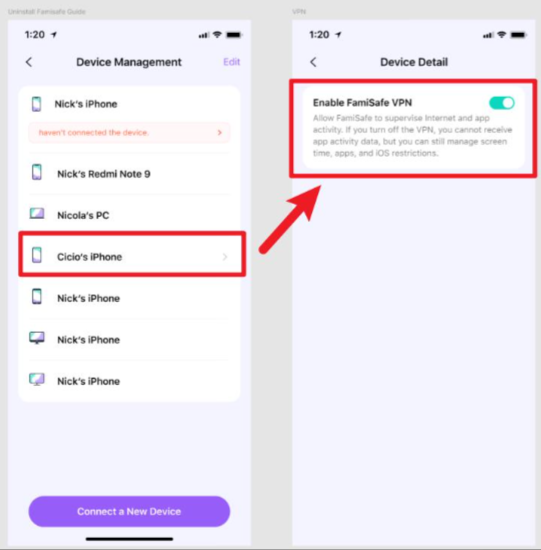
2. If the problem persists after the above operations, it is recommended that you temporarily turn off the VPN. The steps are as follows: (1)Make sure that the parent's FamiSafe has been upgraded to the latest version. (2)Open the FamiSafe app and switch to the "Account" page. (3)Find "Device Management" on the account page and enter the device management page. (4)Select the iOS device that needs to be adjusted and enter the VPN switch setting page. (5)Turn the VPN function on or off as needed.
Was This Helpful?
Thanks for your feedback.
Can you tell us what didn't work for you?
Email address is optional. Leave it blank if you do not need follow-up.
Feedback sent!